Preview
Install
copilot plugin install git-tag-manager@awesome-copilotManage local and remote Git tags from a Copilot canvas. Create lightweight or annotated tags at a chosen commit, push an individual tag, and delete local tags, remote tags, or both.
Installation
Once this extension is published to Awesome Copilot, ask Copilot:
Install this extension: https://github.com/github/awesome-copilot/tree/main/extensions/git-tag-manager
Or install the matching marketplace plugin:
copilot plugin install git-tag-manager@awesome-copilot
The plugin manifest registers this reusable extension with Awesome Copilot. The repository build materializes the source into the plugin's com.github.copilot/extensions/ directory for distribution.
For a manual install, copy this entire folder into ~/.copilot/extensions/git-tag-manager/ (user scope) or .github/extensions/git-tag-manager/ (workspace scope). Reload extensions, then open the git-tag-manager canvas.
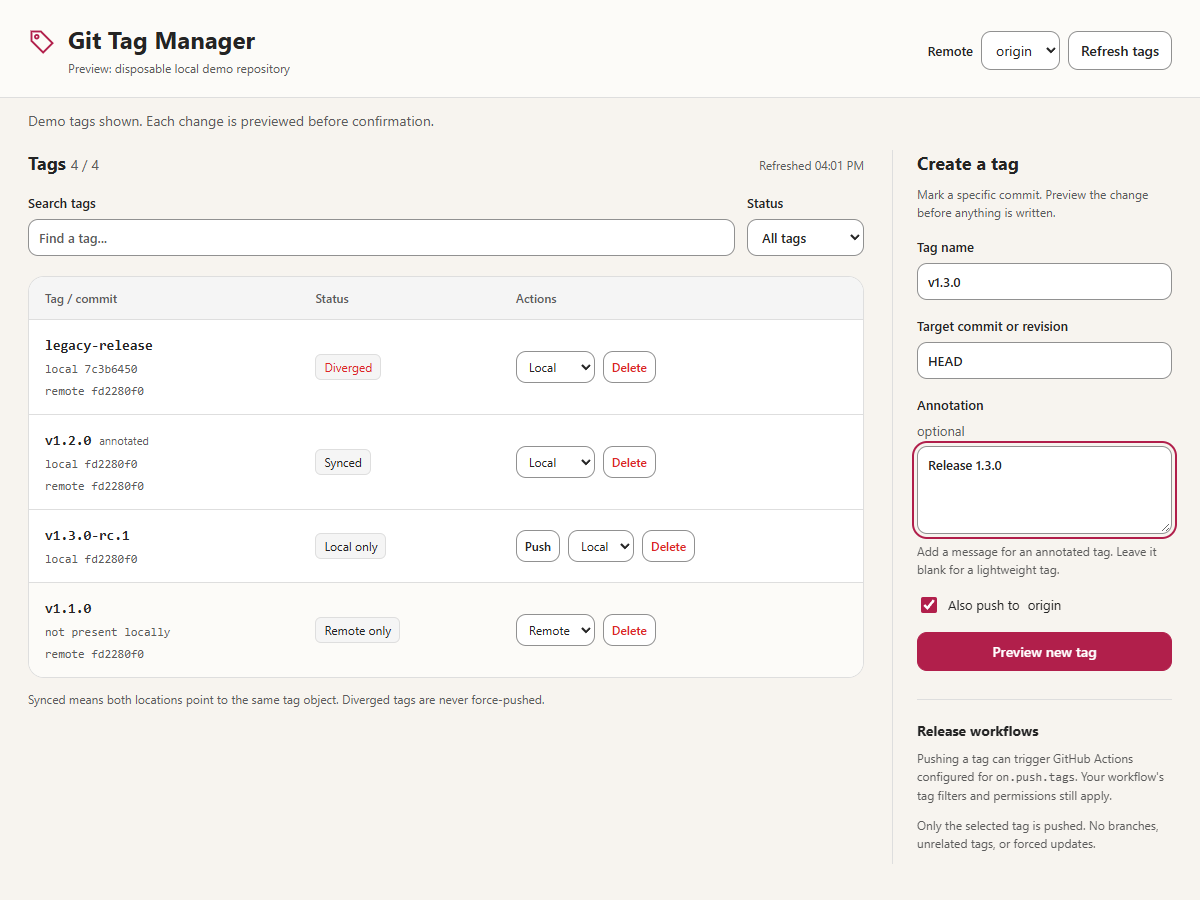
For local development on hosts that do not yet sync canvas files from source plugins, load the same source through an ignored .github/extensions/git-tag-manager symlink or Windows directory junction, then reload extensions. This is a loader alias, not a second source copy. The preview image shows a disposable demo repository.
Files
- extension.mjs - Copilot SDK canvas registration and lifecycle wiring.
- copilot-extension.json - extension name and metadata format version.
- manager.mjs and git.mjs - confirmed operations and Git commands.
- schemas.mjs and storage.mjs - input validation and private preferences.
- server.mjs and public/ - local HTTP transport and canvas UI.
- assets/preview.png - Awesome Copilot gallery preview.
- manager.test.mjs, server.test.mjs, and test-fixture.mjs - disposable local integration tests.

The Copilot runtime resolves @github/copilot-sdk automatically; no dependency installation is needed for this extension.
Usage
Ask Copilot to open git-tag-manager with an object containing an absolute repository path and an optional configured remote name. Without an explicit remote it uses the saved repository preference, origin, or the first configured remote. Repositories without remotes support local tag creation and deletion.
- Search tags and filter by synced, local-only, remote-only, or diverged status.
- Preview a creation, push, or deletion, then type the exact tag name to confirm.
- Existing local and remote tags are never overwritten by creation or push.
- Remote deletion uses an explicit expected-object lease; local deletion checks the expected object ID.
- Pushes disable mirror and follow-tags configuration and send only the selected tag refspec.
- Remotes with different fetch/push URLs or multiple push destinations are refused for mutations; use a dedicated remote with matching URLs.
- A failed multi-step operation reports completed changes without silently rolling them back. Refresh before retrying.
- Git authentication and author identity must already be configured. Commands are noninteractive and time out after 60 seconds.
Pushing a tag can trigger GitHub Actions workflows configured for on.push.tags; it does not automatically dispatch unrelated workflows. GitHub permissions, workflow filters, and token restrictions still apply. Deleting a remote tag can also trigger workflows listening for deletion.
Canvas actions
Canvas ID: git-tag-manager.
| Action | Input | Behavior |
|---|---|---|
refresh |
None | Reads current local and selected-remote tags. |
select_remote |
{ "remote": "origin" } |
Selects and remembers a configured remote. |
prepare_operation |
{ "operation": "create", "name": "v1.2.3", "target": "HEAD", "message": "Release 1.2.3", "push": true } |
Previews an operation for user confirmation; does not mutate refs. |
For push use operation: "push" and name. For deletion use operation: "delete", name, and scope: "local", "remote", or "both". Previews expire after five minutes and are not persisted across provider reloads.
Git is the source of truth for tags. Private repository/remote preferences are stored in extension-data/git-tag-manager/<repository-path-sha256>.json under COPILOT_HOME when nonempty, otherwise ~/.copilot. Preference files are versioned, validated, and atomically replaced. Reopening the same instance reuses its server and reloads Git state.
Validation
node --check extensions/git-tag-manager/extension.mjs
node --test extensions/git-tag-manager/manager.test.mjs extensions/git-tag-manager/server.test.mjs
npm run plugin:validate
npm run build
npm run website:data
Tests use temporary working trees and local bare remotes; no GitHub tags are modified.
License
MIT