Preview
Install
copilot plugin install pr-artifact-explorer@awesome-copilotGitHub, the missing parts: GitHub Actions makes artifacts easy to produce, but pull-request reviewers still have to download opaque ZIP files and inspect them out of context. Artifact Explorer turns those artifacts into a fast, GitHub-native, navigable experience inside Copilot, whether they came from a pull request or from a scheduled, manual, push or release run.
Artifact Explorer is a community-built Copilot canvas extension with the internal extension ID pr-artifact-explorer. It is not an official GitHub product or endorsed feature.
What it does
- Navigates repositories, pull requests, workflow runs, artifacts, and files with persistent breadcrumbs.
- Browses workflow runs that have no pull request. A repository-level Workflow runs tab lists runs from any trigger (scheduled/cron, manual, push, release, and more) with event, status, workflow and branch pickers (the branch picker autocompletes real branches), paging, and linked-PR chips. "Hide PR runs" and "Has artifacts" are on by default, so the list starts with runs that have no pull request and produced artifacts; turn either off to see everything. Artifact counts load lazily per run. A run page lists its artifacts and reuses the same preview, Browser view, sharing and Re-run features.
- Loads pull requests progressively, caches result pages, and supports query filters for fast review.
- Bounds artifact discovery to the newest 30 workflow runs per head commit and reports when older runs are omitted.
- Downloads an artifact once, indexes its ZIP, and streams entries directly from the archive without extracting them to disk.
- Previews root-level static sites in a sandboxed loopback frame when the artifact contains
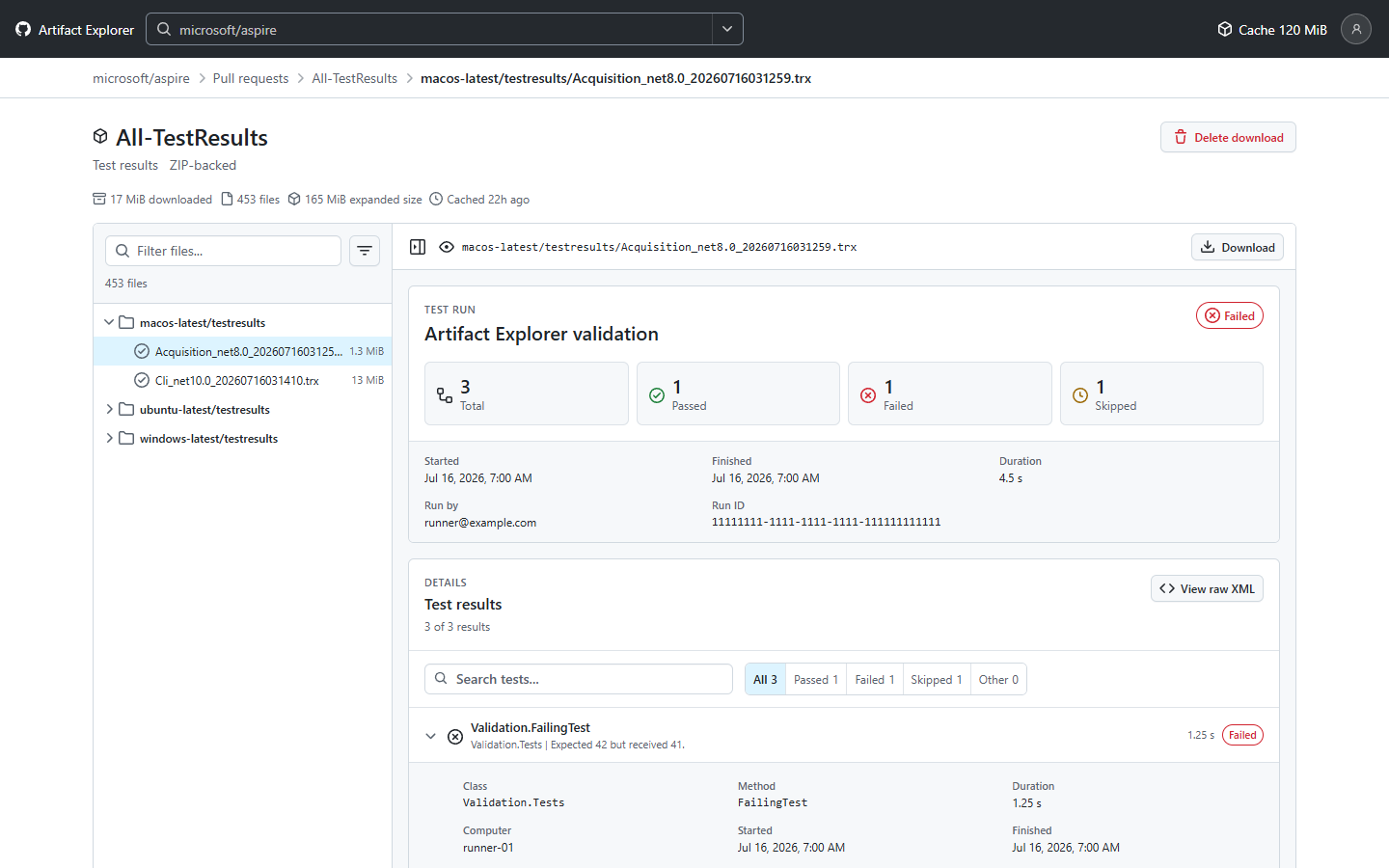
index.html. - Plays asciinema terminal recordings and renders structured TRX and JUnit XML test reports (content-detected; other XML keeps the plain viewer). Plays
.webm,.mp4and.movwith native video controls and byte-range seeking; playback depends on the browser's codecs, with a download fallback. A contextual "Browser view" action appears only when previewing an HTML artifact. - Syntax-highlights JSON and XML, previews images and PDFs, renders text with safe escaping, and identifies binary content.
- Keeps large files available for direct download and falls back to the original artifact archive when a ZIP entry uses an unsupported encoding.
- Provides per-artifact cleanup, clear-all cleanup, and a cache usage view.
- Uses a responsive Primer interface that follows Copilot's light and dark themes.
- Runs downloads, indexing, and decompression as recoverable background jobs that are independent of any request or view, with progress (percent, bytes, speed, time left) in a sized panel that toast messages stack above. Closing the view, retrying, or restarting the canvas never kills them, and a completed ZIP is reused on retry. A provider termination is reported honestly as
interruptedwith a Retry action. - Soft limits (download size, ZIP entries, central-directory size, streamed entry size, idle time) never stop work. When one is crossed the job keeps running and the canvas asks for a larger value; the new limit must be at least the live value at submission and is checked atomically against live progress.
- Supports ZIP64 and validates the full central directory. The only hard stops are real integrity, safe-integer, path, and free-disk guards; there are no hidden size ceilings.
- Provides a browser-style preview for localhost and HTTP(S) URLs: Mobile/Tablet/Desktop/Native/Custom viewport presets, windowed zoom (separate from the viewport), back/forward/refresh, natural-language navigation, and a keyboard-hint overlay (
?). Pages that forbid framing are reported, never bypassed. - Captures real Playwright/Chromium screenshots with device emulation.
screenshotdefaults to a fresh render (labelledfresh-render);mode: "controlled"captures the live isolated Chromium page (controlled-current). PNGs are saved under the sessionfiles/artifact-explorer-screenshotsfolder. - Offers an isolated controlled Chromium (in-memory profile, no login state) with real back/forward/refresh that survives device changes, for sites that block embedding.
- Includes copy buttons after titles and a
#numberlink to the canonical GitHub issue or pull request, with an adjacent copy-link button. - Ships a built-in Docs tab and a sharing skill (
pr-artifact-explorer) for share links, artifact IDs, and routes.
Screenshot setup
Screenshots need Playwright and a Chromium browser. Nothing is installed silently:
npm install                       # in the extension folder; installs optional playwright-core
npx playwright-core install chromium
Playwright is loaded lazily from the extension's own playwright-core dependency; loading it from arbitrary paths is not supported. The legacy PR_ARTIFACT_EXPLORER_PLAYWRIGHT variable is rejected with an explicit playwright_config_unsupported error until it is unset. Optional: PR_ARTIFACT_EXPLORER_CHROMIUM (path to a Chromium/Chrome/Edge executable). Without a runtime the action returns explicit setup instructions. A fresh isolated profile is used for every capture; no login profile is persisted.
Security and local data
Artifact Explorer inherits eligible GitHub accounts from the Copilot app, GitHub CLI, or process environment. Tokens remain inside the extension process: the canvas receives only sanitized account metadata, while authenticated GitHub API requests are made by the local extension server.
Standalone sidebar canvases may not inherit session account tokens. When APPDATA is missing on Windows, the GitHub CLI subprocess tries an existing USERPROFILE\.config\gh directory first; if it is missing or none of its saved GitHub.com accounts authenticate (for example, a revoked or expired token), it asks Windows for the current user's Roaming folder, including redirected locations. A home-store credential still counts when it is also supplied by Copilot or the environment; a subsequent repository-check error does not trigger Roaming fallback. It uses that folder only when the Windows profile matches USERPROFILE. On macOS and Linux, a missing or empty HOME is restored for the subprocess when an absolute home is available, falling back to the OS account lookup if the environment-based lookup fails. Existing GH_CONFIG_DIR, XDG_CONFIG_HOME, and APPDATA settings are preserved and disable that fallback. When GH_HOST targets a host other than github.com, GH_TOKEN and GITHUB_TOKEN are not used for GitHub.com. These variables do not identify their host, so without GH_HOST they are assumed to be for GitHub.com. If a location cannot be recovered safely or Windows settings conflict, the canvas reports the problem instead of guessing an account store. No sign-in or GitHub CLI account switch is performed.
Standalone canvases without conversation credentials need a saved GitHub CLI account. If necessary, sign in with gh auth login --hostname github.com or open the canvas from a session. Use the GitHub accounts button to see diagnostics and rescan after signing in. The GitHub CLI must be available to the extension, and saved GitHub CLI accounts for other hosts are not used for GitHub.com requests.
Artifact ZIPs and preferences are stored under:
$COPILOT_HOME/extensions/pr-artifact-explorer/artifacts/
When COPILOT_HOME is unset, it defaults to ~/.copilot. Cached archives remain local until removed through the per-artifact or clear-all controls.
The canvas server validates its canonical loopback host and requires a per-instance capability token for API, artifact-content, and event requests. Static-site previews bind to a separate ephemeral 127.0.0.1 port, validate their loopback host, apply a restrictive content security policy, prevent path traversal, and stream files from the ZIP. A preview requires index.html at the artifact root. Static content is untrusted, remains sandboxed by the canvas, and has no access to GitHub tokens.
Install
Ask Copilot to install the committed extension:
Install this extension: https://github.com/github/awesome-copilot/tree/main/extensions/pr-artifact-explorer
You can also copy the folder to one of the supported extension locations:
~/.copilot/extensions/pr-artifact-explorer/for user scope.github/extensions/pr-artifact-explorer/for project scope
Reload extensions, then ask Copilot to open the pr-artifact-explorer canvas. You can optionally provide a repository (owner/name), pull request number, workflow run ID, or a GitHub pull request, run, or Actions URL when opening it.
User-scoped copies and installed plugin copies are independent. Updating the plugin does not update a folder copied into ~/.copilot/extensions/; update that copy too if it is the provider selected by your standalone canvas.
Agent actions
open_pull_request { repository, pullNumber }- navigate an open canvas to a pull request.open_runs { repository, event?, status?, branch?, workflow?, excludePullRequests?, hasArtifacts? }- open a repository's workflow runs (for exampleevent: "schedule"for cron runs).excludePullRequestsandhasArtifactsdefault to true; pass false to include PR runs or runs with no artifacts.open_run { repository, runId }- open one workflow run and its artifacts.open_target { input }- open any share link, URL, issue/PR, workflow run or Actions page, artifact, or route.inspect_artifact { repository, artifactId }- start a recoverable job to download, index, detect, and open an Actions artifact.job_status,retry_job,cancel_job,set_limit { kind, value }- manage jobs and soft limits.restart_canvas- restart the instance (same port and token) without stopping jobs.navigate_browser,set_viewport,set_zoom,screenshot- drive the browser preview.controlled_navigate,controlled_back,controlled_forward,controlled_refresh,controlled_close- drive the isolated controlled Chromium.share { input, preset?, zoom?, width?, height? }- build shareable links that round-trip throughopen_target.docs { section? }- open the built-in Docs tab.cache_status- report local artifact cache usage.clear_cache { artifactId? }- remove one cached artifact or clear the entire cache.accounts- list sanitized GitHub account metadata available to the extension.set_account { id }- select the GitHub account used for repository and artifact requests.
Included third-party components
The extension bundles Primer CSS, Octicons, and the asciinema player for offline rendering. Their notices are preserved in third-party-licenses/.